
Global Cache IP2IR Plugin
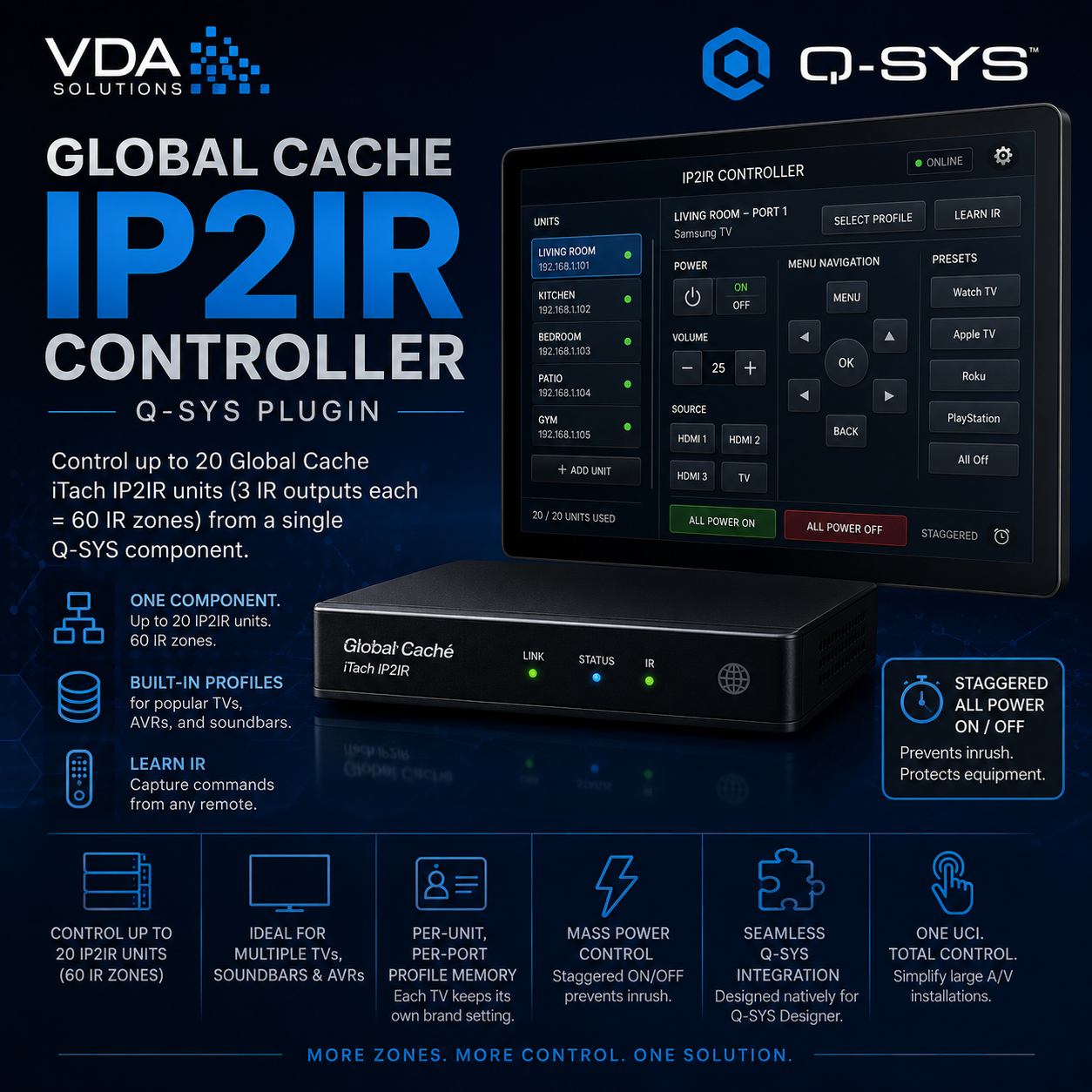
A Q-SYS Designer plugin that controls up to 20 Global Cache iTach IP2IR units (3 IR outputs each = 60 IR zones) from a single component. Built for A/V installations where one UCI needs to drive many IR-controlled TVs, soundbars, and AVRs.
Includes built-in profiles for common TVs and AVRs, plus IR learning directly from a real remote. Per-unit-per-port profile memory means each TV keeps its own brand setting. Staggered "All Power On/Off" handles mass power control without inrush.
Installation
Download GlobalCache_IP2IR.qplugx
Drop it into your Q-SYS Designer plugins folder:
Mac: ~/Documents/QSC/Q-Sys Designer/Plugins/
Windows: Documents\QSC\Q-Sys Designer\Plugins\
Restart Q-SYS Designer
The plugin appears under its category in the plugin list — drag it into your design
To update an existing plugin in a design, bump the Version in the plugin file. Q-SYS Designer will prompt to upgrade the component and wiring is preserved.
Setup
Add the plugin to your design
In properties, set:
Unit Count — number of iTach units (1–20)
Port 1 / 2 / 3 Name — friendly names for your three IR outputs (e.g. "Main Bar", "Patio", "Soundbar"). These flow to the UI, dropdowns, and pin names.
Enter the IP of each unit in the plugin UI — auto-connects on entry
For each unit, select it and set the three port profiles (Samsung TV, LG TV, Sony TV, etc.) — these persist per unit
IR Learning
If a TV brand isn't in the built-in profiles, or you need commands that aren't in the profile:
Select the unit that has the TV wired to it
Pick Learn Port (which of the 3 IR outputs)
Type a command name in Learn Command (use the canonical names so they match the remote button mapping: power, power_on, power_off, vol_up, vol_down, mute, ch_up, ch_down, source, menu, guide, info, up, down, left, right, enter, exit, back, home, num_0 through num_9, play, pause, stop, rew, fwd, record, red, green, yellow, blue)
Press Learn — status shows "Listening"
Aim the remote at the iTach's front IR receiver and press the button
Captured code appears in Learned Code, status shows "Captured!"
Press Save — code is stored as JSON in the design file and persists across reboots
Learned codes override built-in profiles, so you can learn individual commands to fix quirky remotes.
Shared Remote
The remote panel in the plugin routes commands to the active unit + active port:
Wire your UCI remote buttons (Power, Vol Up, Mute, Input Source, numbers, nav, etc.) to the plugin's remote controls
Select a unit, select an Active Port from the dropdown — next button press goes there
Per-Unit Per-Port Control Pins
This is where the plugin shines for automation. Every IR output on every unit gets dedicated input pins:
U1-<PortName> Pwr / On / Off / Input
U2-<PortName> Pwr / On / Off / Input
etc.
So with 10 units and port names "Bar", "Patio", "Soundbar", you get pins like U3-Patio Off — wire those to schedules, triggers, or other components to control any IR output directly.
All Power On / Off (Staggered)
Built-in sequenced trigger for mass power control:
Press All Power On — sends power_on to every port on every connected unit, staggered
Press All Power Off — same but power_off
Adjust Stagger Delay (50–2000ms) to control spacing — default 300ms
Both buttons also have input pins so you can trigger mass power from a schedule or a physical button wired elsewhere.
Key Controls / Pins
PinDirectionPurposeUnit IP 1..NInputIP address per unitUnit Name 1..NInputFriendly name per unitUnit Select 1..NInputSelect active unitUnit Status 1..NOutputConnection statusUnit LED 1..NOutputActive unit LEDPort 1 Power Off 1..N etc.InputPer-unit-per-port direct controlAll Power On, All Power OffInputStaggered mass controlStagger DelayInputms between staggered commandsPower, Vol Up, Mute, etc.InputShared remote (routes to active unit/port)
Notes
IR learning uses the iTach's get_IRL / stop_IRL protocol — the IR receiver on the front of the unit must see the remote
Learned codes are shared across all units (same TV model = same code), only the port assignment changes which emitter fires
Built-in profiles cover: Samsung TV, LG TV, Sony TV, Vizio TV, Hisense TV, Samsung Soundbar, Sony Soundbar, Denon AVR, Yamaha AVR
A Q-SYS Designer plugin that controls up to 20 Global Cache iTach IP2IR units (3 IR outputs each = 60 IR zones) from a single component. Built for A/V installations where one UCI needs to drive many IR-controlled TVs, soundbars, and AVRs.
Includes built-in profiles for common TVs and AVRs, plus IR learning directly from a real remote. Per-unit-per-port profile memory means each TV keeps its own brand setting. Staggered "All Power On/Off" handles mass power control without inrush.
Installation
Download GlobalCache_IP2IR.qplugx
Drop it into your Q-SYS Designer plugins folder:
Mac: ~/Documents/QSC/Q-Sys Designer/Plugins/
Windows: Documents\QSC\Q-Sys Designer\Plugins\
Restart Q-SYS Designer
The plugin appears under its category in the plugin list — drag it into your design
To update an existing plugin in a design, bump the Version in the plugin file. Q-SYS Designer will prompt to upgrade the component and wiring is preserved.
Setup
Add the plugin to your design
In properties, set:
Unit Count — number of iTach units (1–20)
Port 1 / 2 / 3 Name — friendly names for your three IR outputs (e.g. "Main Bar", "Patio", "Soundbar"). These flow to the UI, dropdowns, and pin names.
Enter the IP of each unit in the plugin UI — auto-connects on entry
For each unit, select it and set the three port profiles (Samsung TV, LG TV, Sony TV, etc.) — these persist per unit
IR Learning
If a TV brand isn't in the built-in profiles, or you need commands that aren't in the profile:
Select the unit that has the TV wired to it
Pick Learn Port (which of the 3 IR outputs)
Type a command name in Learn Command (use the canonical names so they match the remote button mapping: power, power_on, power_off, vol_up, vol_down, mute, ch_up, ch_down, source, menu, guide, info, up, down, left, right, enter, exit, back, home, num_0 through num_9, play, pause, stop, rew, fwd, record, red, green, yellow, blue)
Press Learn — status shows "Listening"
Aim the remote at the iTach's front IR receiver and press the button
Captured code appears in Learned Code, status shows "Captured!"
Press Save — code is stored as JSON in the design file and persists across reboots
Learned codes override built-in profiles, so you can learn individual commands to fix quirky remotes.
Shared Remote
The remote panel in the plugin routes commands to the active unit + active port:
Wire your UCI remote buttons (Power, Vol Up, Mute, Input Source, numbers, nav, etc.) to the plugin's remote controls
Select a unit, select an Active Port from the dropdown — next button press goes there
Per-Unit Per-Port Control Pins
This is where the plugin shines for automation. Every IR output on every unit gets dedicated input pins:
U1-<PortName> Pwr / On / Off / Input
U2-<PortName> Pwr / On / Off / Input
etc.
So with 10 units and port names "Bar", "Patio", "Soundbar", you get pins like U3-Patio Off — wire those to schedules, triggers, or other components to control any IR output directly.
All Power On / Off (Staggered)
Built-in sequenced trigger for mass power control:
Press All Power On — sends power_on to every port on every connected unit, staggered
Press All Power Off — same but power_off
Adjust Stagger Delay (50–2000ms) to control spacing — default 300ms
Both buttons also have input pins so you can trigger mass power from a schedule or a physical button wired elsewhere.
Key Controls / Pins
PinDirectionPurposeUnit IP 1..NInputIP address per unitUnit Name 1..NInputFriendly name per unitUnit Select 1..NInputSelect active unitUnit Status 1..NOutputConnection statusUnit LED 1..NOutputActive unit LEDPort 1 Power Off 1..N etc.InputPer-unit-per-port direct controlAll Power On, All Power OffInputStaggered mass controlStagger DelayInputms between staggered commandsPower, Vol Up, Mute, etc.InputShared remote (routes to active unit/port)
Notes
IR learning uses the iTach's get_IRL / stop_IRL protocol — the IR receiver on the front of the unit must see the remote
Learned codes are shared across all units (same TV model = same code), only the port assignment changes which emitter fires
Built-in profiles cover: Samsung TV, LG TV, Sony TV, Vizio TV, Hisense TV, Samsung Soundbar, Sony Soundbar, Denon AVR, Yamaha AVR